'%3e%3cg%20transform='matrix(0.737731,0,0,0.737731,1584.657279,93.052323)'%3e%3cg%20transform='matrix(1,0,0,1,-73.197369,-28.78343)'%3e%3cg%20transform='matrix(2.327683,0,0,2.327683,-115.888888,-940.785017)'%3e%3cpath%20d='M610.12,610.782L535.09,610.782L535.09,570.757L618.413,570.757L610.12,610.782ZM628.935,570.757L697.713,570.757C709.523,570.757%20720.131,571.523%20729.536,573.054C738.94,574.585%20746.923,577.373%20753.485,581.42C760.046,585.466%20765.077,591.043%20768.576,598.151C772.076,605.26%20773.825,614.391%20773.825,625.545C773.825,632.107%20772.841,638.504%20770.873,644.737C768.904,650.971%20766.006,656.548%20762.179,661.469C758.351,666.39%20753.758,670.491%20748.4,673.772C743.041,677.052%20736.863,679.13%20729.864,680.005L729.864,680.661C741.018,683.723%20749.603,689.574%20755.617,698.213C761.632,706.852%20764.639,716.858%20764.639,728.231C764.639,740.917%20762.179,752.071%20757.258,761.695C752.337,771.318%20745.721,779.301%20737.409,785.644C729.098,791.987%20719.584,796.798%20708.867,800.079C698.15,803.36%20686.886,805%20675.076,805L580.368,805L581.484,799.615L609.457,665.57L687.543,665.57C696.947,665.57%20705.094,663%20711.984,657.86C718.873,652.72%20722.318,645.011%20722.318,634.731C722.318,625.545%20719.858,619.257%20714.937,615.867C710.015,612.477%20703.399,610.782%20695.088,610.782L620.636,610.782L628.935,570.757ZM638.101,764.975L672.779,764.975C684.59,764.975%20694.268,761.804%20701.814,755.461C709.359,749.119%20713.132,739.714%20713.132,727.247C713.132,721.123%20711.875,716.312%20709.359,712.812C706.844,709.313%20703.618,706.633%20699.681,704.774C695.744,702.915%20691.37,701.767%20686.558,701.33C681.747,700.892%20677.044,700.673%20672.451,700.673L651.88,700.673L638.101,764.975Z'%20style='fill:rgb(25,23,20);'/%3e%3c/g%3e%3cg%20transform='matrix(1,0,0,1,0,220.238764)'%3e%3cpath%20d='M1259.334,480.922L1129.63,480.922L1129.63,387.757L1278.681,388.212L1259.334,480.922Z'%20style='fill:rgb(0,120,111);'/%3e%3c/g%3e%3cg%20transform='matrix(1,0,0,1,0,452.077913)'%3e%3cpath%20d='M1210.953,480.922L1129.63,480.922L1129.63,387.757L1230.395,387.757L1210.953,480.922Z'%20style='fill:rgb(0,120,111);'/%3e%3c/g%3e%3cg%20transform='matrix(1,0,0,1,0,336.158338)'%3e%3cpath%20d='M1235.144,480.922L1129.63,480.922L1129.63,387.757L1254.586,387.757L1235.144,480.922Z'%20style='fill:rgb(0,120,111);'/%3e%3c/g%3e%3c/g%3e%3c/g%3e%3c/g%3e%3c/svg%3e)
The system batch manufacturers run on.
One formula holds the composition, the method, the parameters and the cost. Around it, the same system runs your purchasing, your stock and the batch itself. Every run seals what was made, what went in, and what it really cost.
- A formula in percentages, with phases, parameters and a yield on every version.
- Every batch prices itself from the deliveries you actually received.
- Lot traceability and the sealed batch record cost nothing extra.

A spreadsheet gets you surprisingly far. Then it doesn't.
A recipe binder and a stock sheet hold up until the versions, the prep and the production start drifting apart. The true cost of a plate or a jar is the first thing to go stale, and you tend to notice the morning the margin is already gone.
It came out right last time, but the exact version that made it is gone.
Every version is kept, and each batch records the one it ran.
Two people quote a different price for the same ingredient.
One weighted average, taken from the deliveries you booked.
Nobody can say what a plate, or a finished jar, actually costs to make.
A cost per jar, per plate or per 100 g, built from what you paid.
You find out the stock is short the morning of service, or the day of the run.
The week's plan checks itself against stock before you commit.
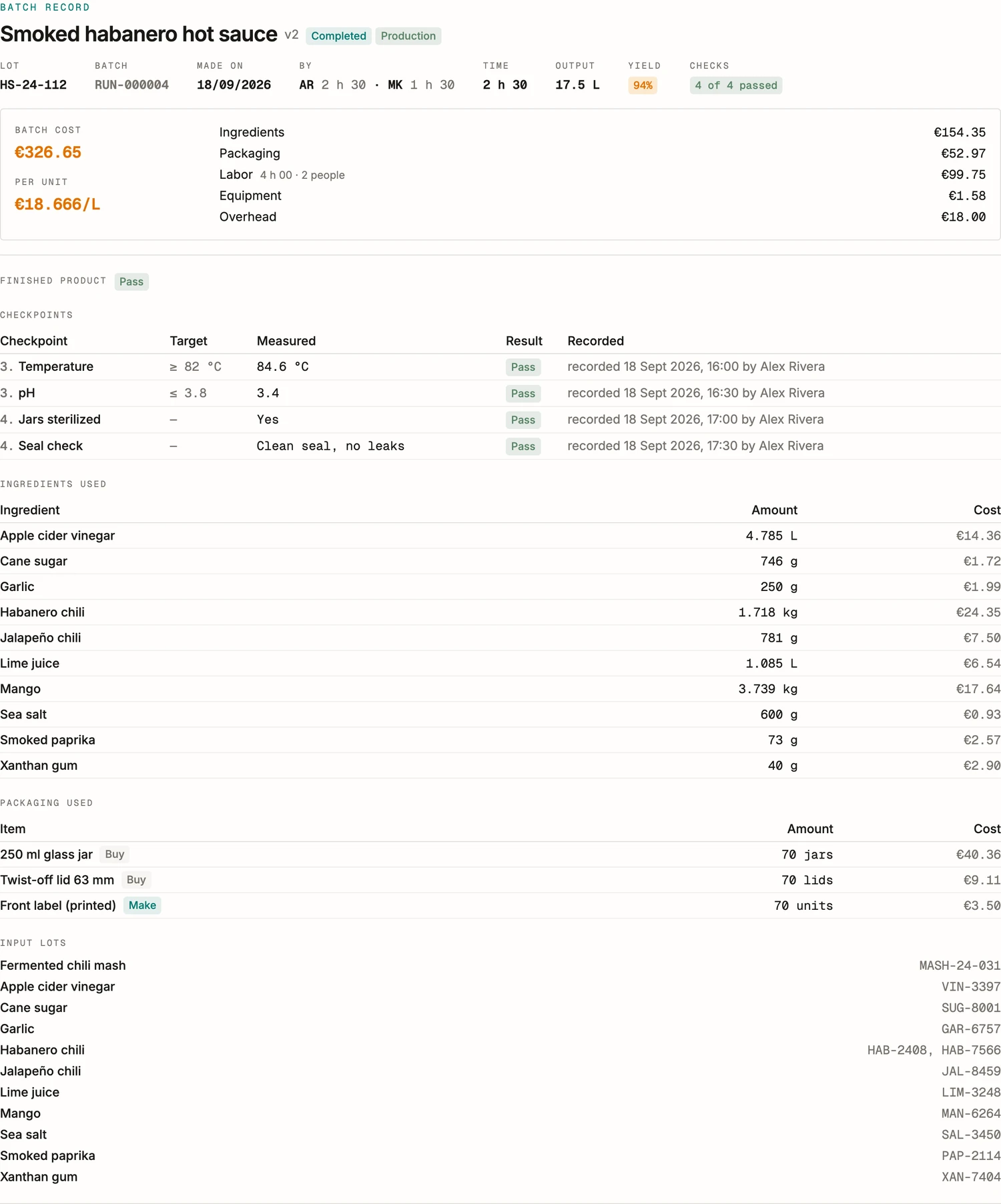
One recipe of smoked habanero hot sauce, followed from formula to printed label. Every screen below is the app, and every figure on it is real.
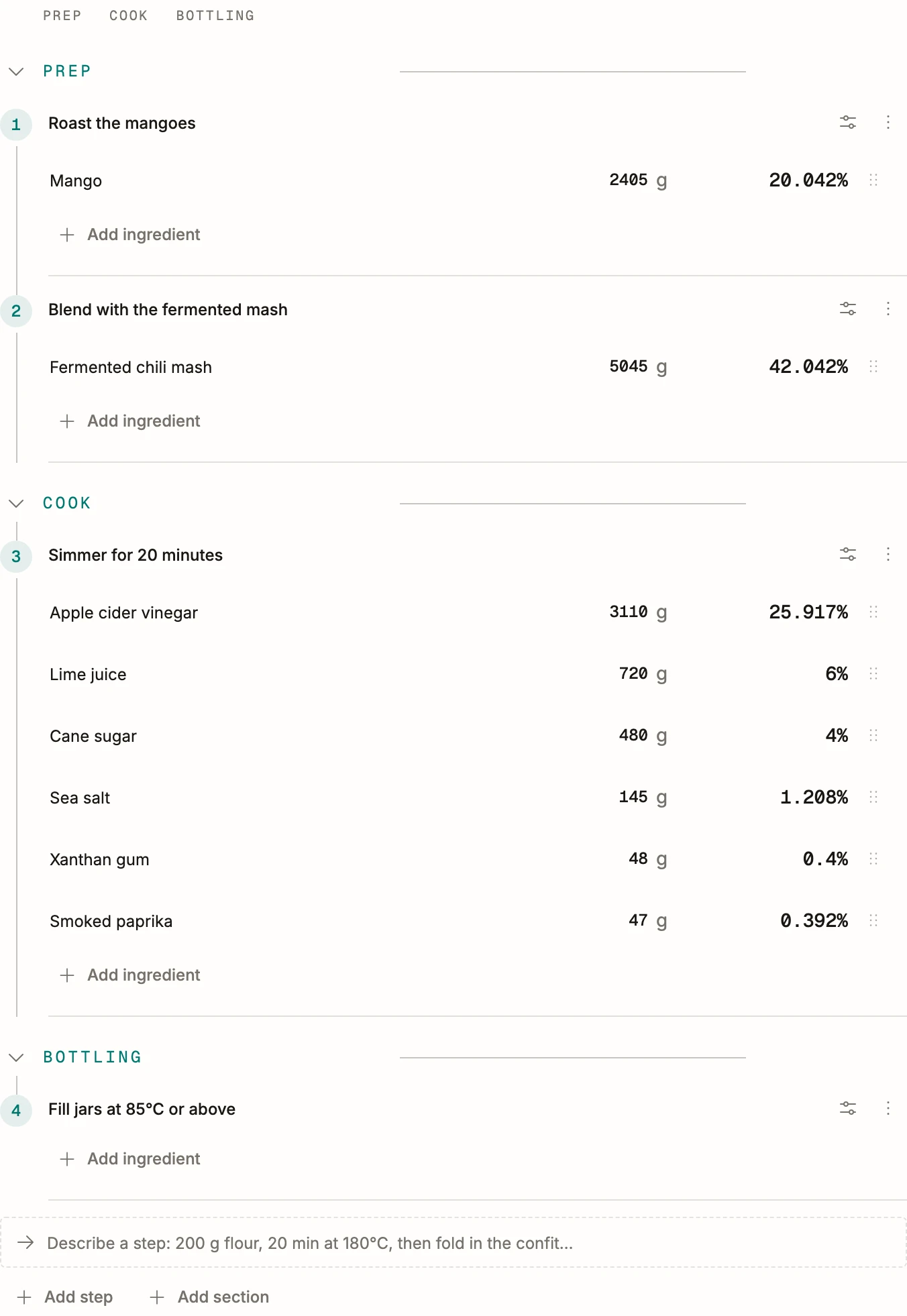
Weigh it. The percentages follow.
Weigh what you actually used on a bench sheet and BatchDash back-computes the percentages, checks the mass balance and reports the yield. Try a change as a new version and the old one stays intact, with the record of what moved and a tasting score to pick the winner.
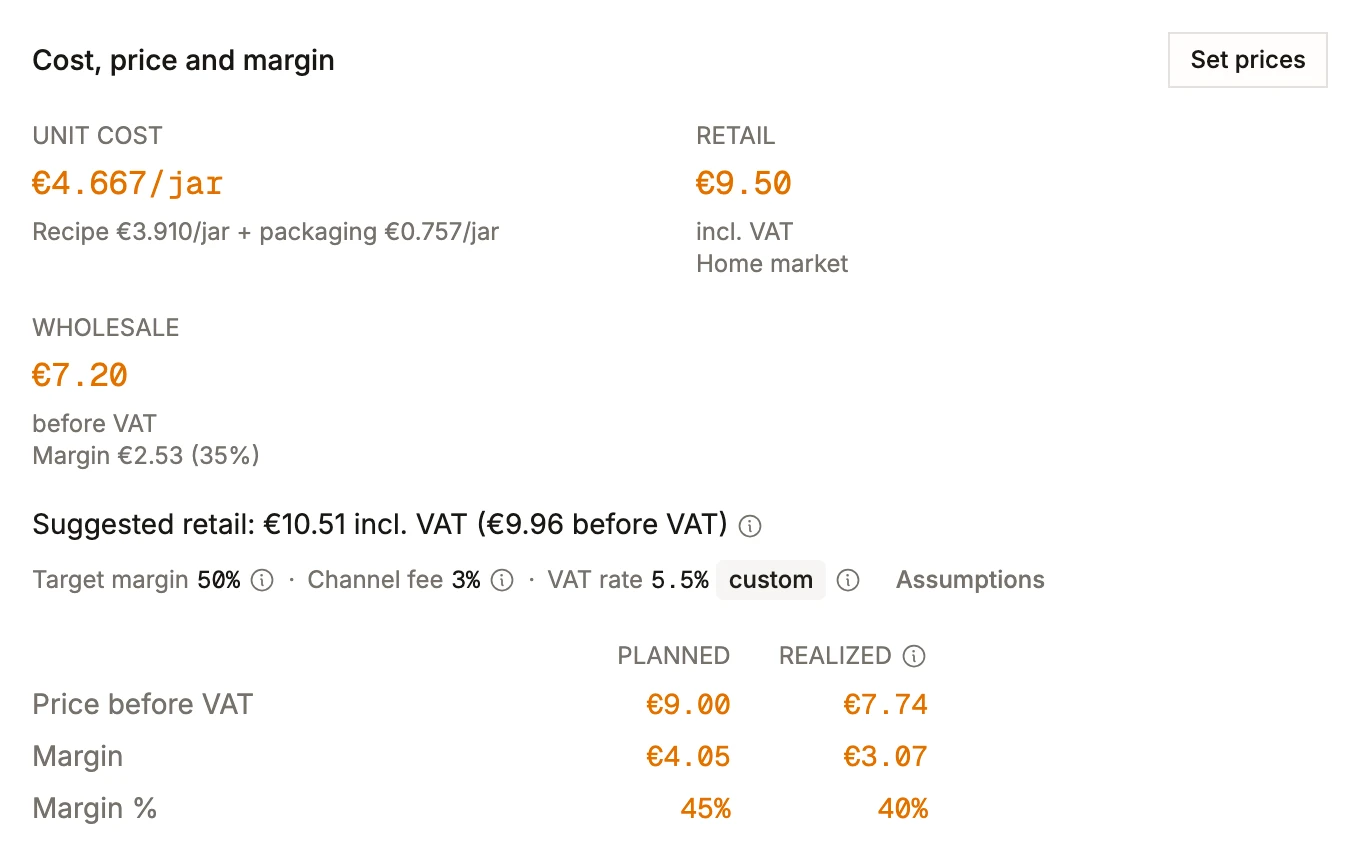
Know the cost and the margin before you commit
See what any version costs per plate, per jar or per 100 g, built from real prices. Vendor offers and weighted average cost feed in, sub-formulas expand on their own, and the full breakdown is there when finance asks where the figure came from. Change one price and every recipe that uses it re-costs. Set a retail and a wholesale price on each format and the product page suggests a price from the true unit cost, then shows the planned margin beside what sales actually earned.
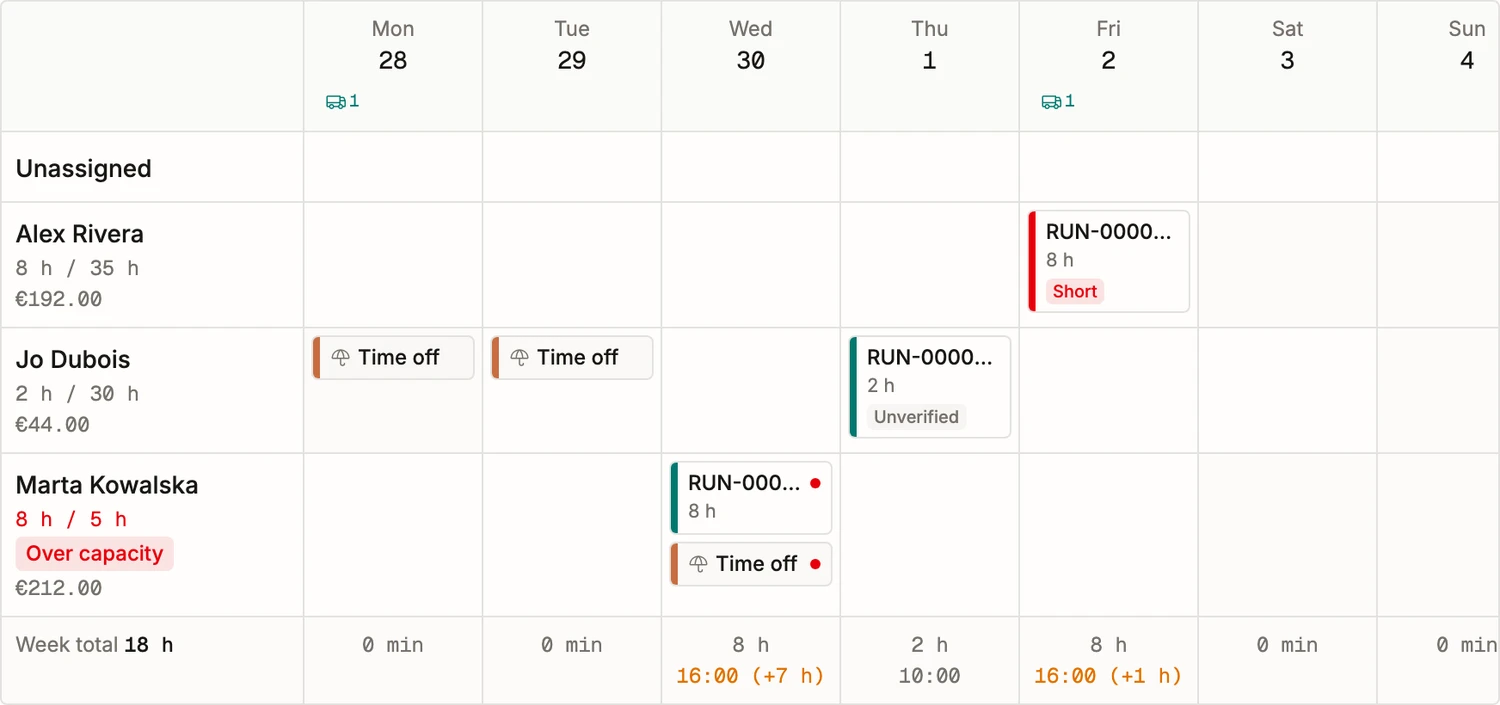
Plan the week. The plan checks itself.
Put batches, prep, packing and time off on one board. Every production day is checked against your stock and incoming orders. When something will be short, you get the last day to order it, per vendor.
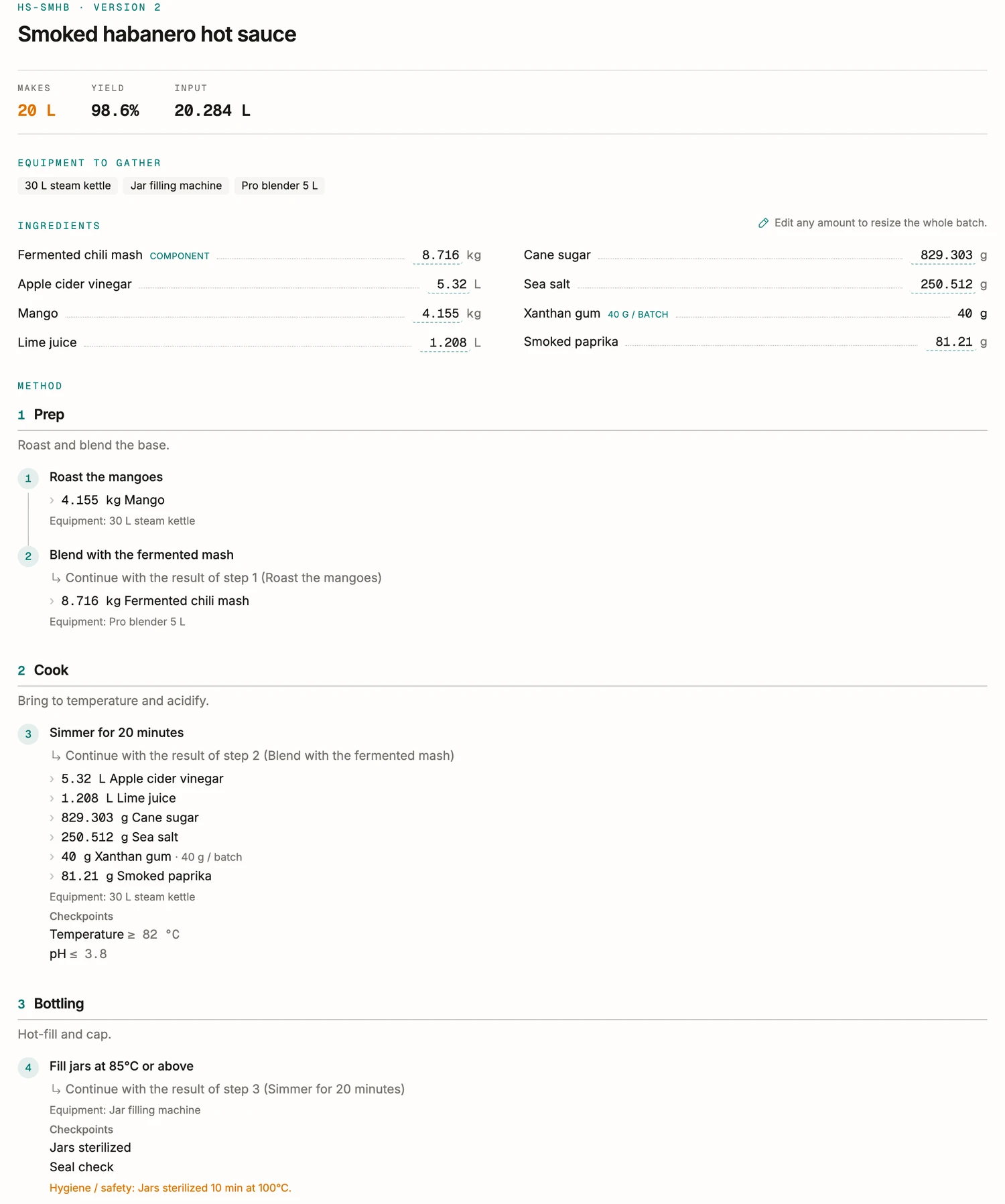
The recipe sheet your line actually follows.
Type a batch size and the whole recipe rescales: the equipment to gather, the ingredients to weigh, and the method step by step. Checkpoints and tick boxes turn it into a worksheet you can print, for the kitchen or the lab.
Ask a finished batch what it did. It still knows.
A finished batch seals its record: the recipe as it ran, the weighed quantities, the steps and their parameters, the checks, the lots that went in and the lot that came out. Editing the recipe next month changes nothing about it.
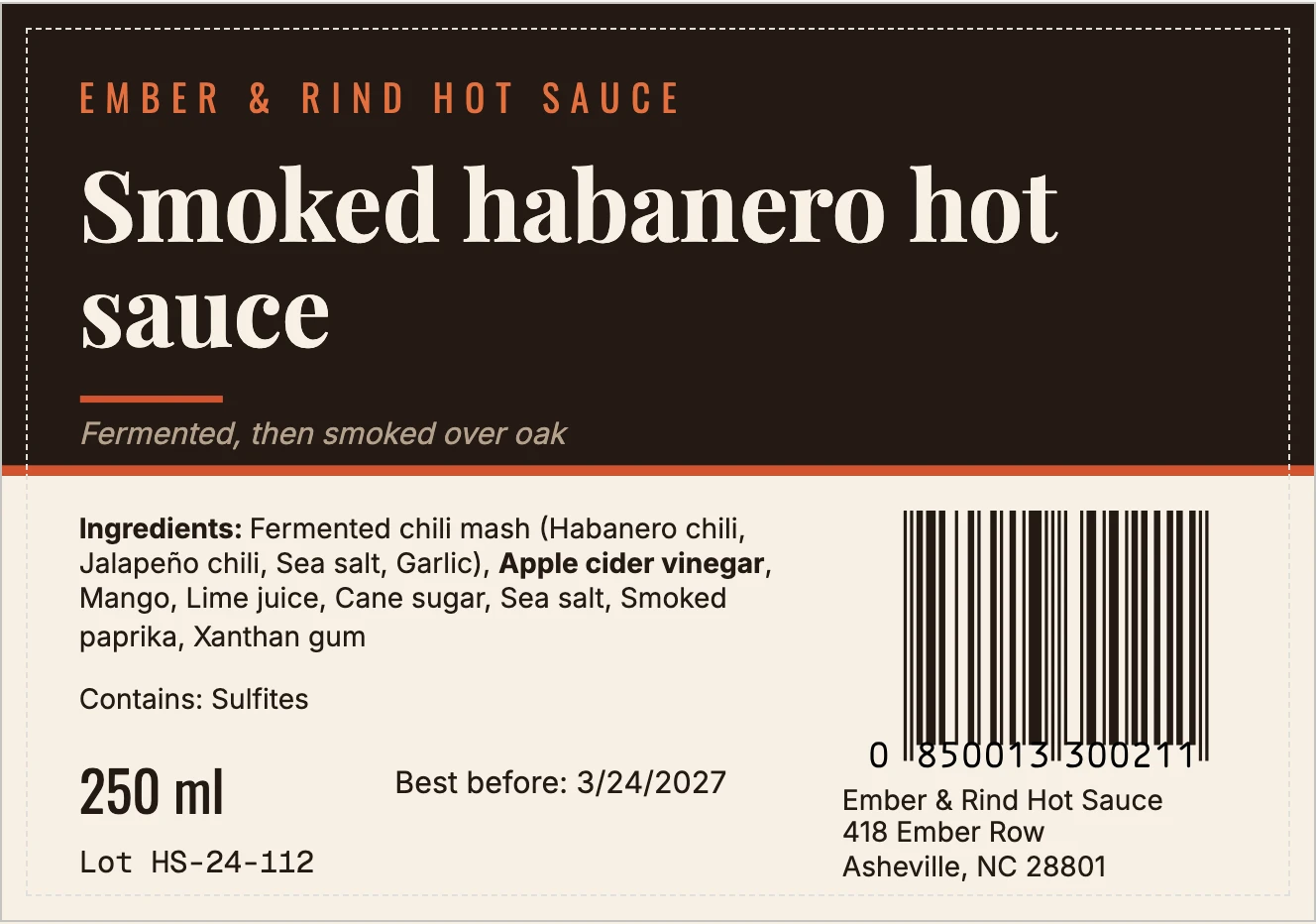
A label editor that has already read your recipe.
Draw the label in the app itself: drag text, your artwork and barcodes on a millimeter canvas, and watch the finished label take shape live, filled from a real batch as you design. The ingredient declaration writes itself off the formula, descending order, allergens in bold, and the lot and dates come from the batch that prints it.
Where the other options stop.
You are probably running this on a spreadsheet, or on a system built to count parts. Neither one knows what a formula is.
Hold a recipe as percentages, with phases and a yield
- A spreadsheet
- The formula breaks when a row moves.
- An MRP built for parts
- Built to count units of parts.
- BatchDash
- Percentages, phases and yield, on every version.
Know what a batch actually cost
- A spreadsheet
- True on the day you typed it.
- An MRP built for parts
- A standard cost you keep by hand.
- BatchDash
- The weighted average of what you paid.
Trace a lot forward and back
- A spreadsheet
- A column somebody has to remember.
- An MRP built for parts
- Sold as an upgrade.
- BatchDash
- In every batch record, both directions.
Prove a batch was made right
- A spreadsheet
- A photo of a sheet, in a folder.
- An MRP built for parts
- A work order that closes and moves on.
- BatchDash
- A sealed record with its checks and its lots.
Print a label with its ingredient declaration
- A spreadsheet
- Retyped for every product.
- An MRP built for parts
- Outside what it does.
- BatchDash
- Written from the formula, filled by the batch.
Put one recipe inside another
- A spreadsheet
- Copy the rows and watch them drift.
- An MRP built for parts
- A sub-assembly, stocked as a part.
- BatchDash
- A sub-formula that expands and costs itself.
Scale a batch and have everything follow
- A spreadsheet
- Multiply by hand and hope.
- An MRP built for parts
- Quantities scale. The method does not.
- BatchDash
- Ingredients, equipment and method, rescaled together.
Keep stock that production actually consumes
- A spreadsheet
- A second sheet, updated when someone remembers.
- An MRP built for parts
- Yes, for the parts you count.
- BatchDash
- A ledger every figure walks back to.
A spreadsheet cannot hold a formula. An MRP holds parts, and charges again for the lot trail. BatchDash does both, from the first trial to the printed label.
Questions we hear before the first batch.
- Where do the numbers come from?
- From your own deliveries. Every ingredient carries the weighted average of what you actually paid, delivery fees folded in, and every recipe cost is built from that.
- Can I undo a batch?
- Yes. Reverting a completed run returns the stock it consumed and removes what it booked, so a trial costs you nothing but the tasting.
- Does it work for cosmetics as well as food?
- Yes. The same gram-based engine costs a serum and a sauce, and a cosmetic batch writes its INCI list from what went in, with the period after opening beside its date. Cosmetics manufacturing software
- I already have spreadsheets.
- Good, they import. Ingredients, vendor offers, products and the lots on your shelves come in from CSV, one file each; imported rows hit stock and costs exactly like hand-typed ones. What the move looks like
- Can it print my product labels?
- Yes. You design a label template once, and each batch prints it filled with its lot number, dates, net quantity and the ingredient list computed from your formula. Output is a PDF sized for roll printers or label sheets, or an export bundle a label printing service accepts.
- Is there a free trial?
- Plans that carry one say so on their card, and you can cancel during the trial. You start on your own recipes, with your own prices.